Google Earth’s Virtual Prado Museum
Madrid’s Prado Museum has long been a destination for art lovers. In the company of the Uffizi Gallery in Florence, the Louvre Museum in Paris, and the Metropolitan Museum of Art in New York, the Prado is home to countless masterpieces of western art. Unfortunately, the options for viewing its contents have always been either hopping a plane to Madrid or thumbing through printed reproductions that pale in comparison to the original works. Luckily, there’s now a third option with Google Earth’s Prado Museum feature, which offers ultra high resolution photos of 14 of the museum’s masterpieces.
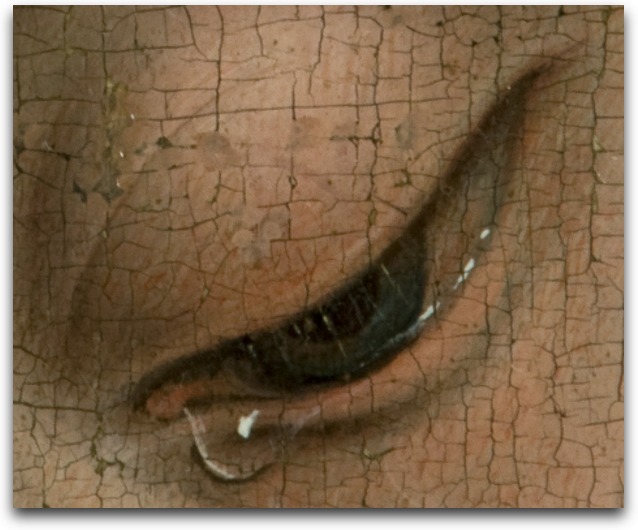
While the project isn’t an acceptable substitute for seeing the works in person, it is an exceptional upgrade to the sorts of reproductions to which we’ve become accustomed. The images of the 14 works, which include Velázquez’s Las Meninas, Goya’s The Third of May 1808, Hieronymus Bosch’s The Garden of Earthly Delights, and Fra Angelico’s Annunciation, are 14,000 million pixels in size – that’s 1,400 times larger than an image that could be captured by a standard 10 megapixel camera! The extreme resolution enables viewers to see not only every stroke of paint, but even the weave of the canvas and cracks in the varnish.

To produce these exceptional images, technicians at the Prado took over 8,200 photographs of each work over the course of three months (Google apparently footed the bill, whose total remains undisclosed.) The photos were then connected and layered using the same technology Google uses to create the incredibly detailed satellite maps for Google Earth.
Unfortunately, Rodriguez Zapatero, the general manager of Google Earth Spain, has said there are no immediate plans to add additional paintings from the Prado, or expand the project to other museums. Hopefully these reproductions will be enough of a hit to encourage Google to help make more of the world’s great artworks available in ultra high resolution.
To view the works, you must first download the Google Earth application. After launching the program, select the 3D buildings layer on the bottom left panel, then enter “Prado Masterpieces” in the search bar. When the Prado Museum result appears, click it to fly to the museum, where a white tile appears. Click that to view the paintings. If nothing else, it’s astonishing to zoom into a picture and not have it pixelate or get fuzzy until you’re so far in that you can’t tell what you’re looking at anyway. (The screenshot is an eyeball from Rogier van der Weyden’s Descent of Christ from the Cross, the full painting of which measures 7.2 by 8.6 feet (220 by 262 cm)!)