Amazon Releases Kindle Software for iPhone
The other shoe has dropped: Amazon last week released Kindle for iPhone, a free application that provides access to the catalog of books available for purchase for Amazon’s dedicated hardware device, the Kindle 2. (See “Kindle 2 Improves Design, Not Features,” 2009-02-26, for a review.)
Once you provide your Amazon account name and password, and the software has logged into your Amazon account, any books that you have purchased through the Kindle store appear in an Archived folder. You can select any book in that folder and it’s immediately downloaded and stored on your iPhone or iPod touch.
If you already own or have owned a Kindle and purchased books, Amazon has – as expected – tied these purchases to your account rather than to the device. This is how Amazon treats its Video on Demand service, providing you a media library instead of delivering files, a distinct difference from purchases made from Apple’s iTunes Store. Lose an iTunes file, and Apple won’t replace it without you jumping through hoops. Delete a Kindle file or Video on Demand file from a device, and you can simply download it again.
You can buy books via Amazon using any Web browser, through the Kindle, or, although Amazon discourages it for reasons of awkwardness, via Safari on the iPhone. Books purchased through any means are available on both Kindle hardware and software.
The iPhone Kindle app offers the same straightforward and simple approach as the Kindle hardware. It provides a slider to page through the book, an add bookmark button to note the current page, a bookmark button to zoom to particular places in a book or marks you’ve noted, and a text size control.
Text is quite legible. The application has the same problem that the Kindle 2 contends with: publishers apparently control whether to allow text to be fully justified (flush against left and right margins, no matter the width), or flush left with a ragged right, traditionally more legible for narrower columns. Full justification often results in strangely spaced lines of text, with rivers of white in lines that contain only longer words. Some sensible publishers opt for flush left justification, which along with hyphenation, seems more appropriate.
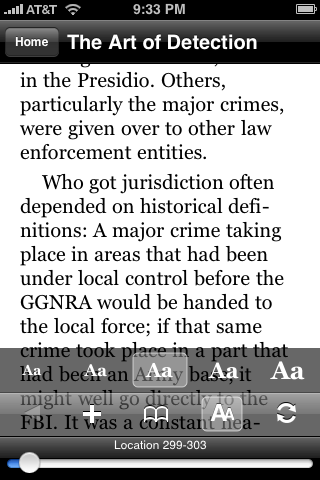
Amazon uses what it calls Whispersync (a counterpart to its Whispernet download system) to ensure that you find yourself at the same page in the book you left off at if you read using multiple devices. A sync button helps you make sure that you have the latest page in front of you, too, and the software alerts you if your click of the sync button was unnecessary, too.
The unfortunate omission of magazine, newspaper, and blog subscriptions may be temporary, or it might be intentional to avoid conflicts with Apple about paid subscription content. No information has surfaced regarding any deal allowing Amazon to sell content through a free iPhone app, something that requires special permission from Apple.
Kindle for iPhone is a bit of a game changer. Overnight, 240,000 books are suddenly available for the iPhone through a free application. This might also signal that Apple has no plans to enter the electronic book reader market – otherwise, why allow Amazon to set up a beachhead?