Protect Yourself from the Mac OS X Java Vulnerability
One of the great things about Macs is how Apple has included a wealth of free and open-source tools in Mac OS X. This collection includes both major portions of the operating system (much of Mac OS X’s Unix core), and numerous additional applications and components. Windows file sharing, printing, and even Safari are all based on open-source tools also used on other platforms. While this provides us with immeasurable benefits, it does present some potential liabilities on the security front. Like all software, these open source components occasionally suffer from security vulnerabilities, but since Apple doesn’t control them, Apple can’t necessarily make code fixes quickly, if at all.
This disconnect can result in a major security issue for Macs (and iPhones) when the vulnerability is patched for other platforms, but Apple fails to provide a fix. Apple has an unfortunate history of leaving some of these vulnerabilities unpatched for months, as is the case with a five-month-old vulnerability in Java.
As reported by researcher Landon Fuller, Mac OS X is vulnerable to a Java flaw that could allow an attacker to execute arbitrary code under the logged-in user’s account. While perhaps not as bad as full administrative access, it still allows an attacker plenty of latitude to perform all sorts of nefarious activity on your system.
While an attacker could technically trick you into downloading and running a malicious program written in Java, it’s far easier for them to trick you into visiting a malicious Web site and take over your system when your browser automatically runs their “bad” Java applet. Attackers have developed ways to sneak these onto even trusted Web sites, so merely sticking with known safe sites isn’t sufficient to stay secure. Landon includes a demonstration exploit on his site, which clearly shows how an attacker could take over your system.
The best way to protect yourself is to turn off Java in your Web browser. This will break some Web sites, but until Apple provides a fix it’s the only way to protect yourself.
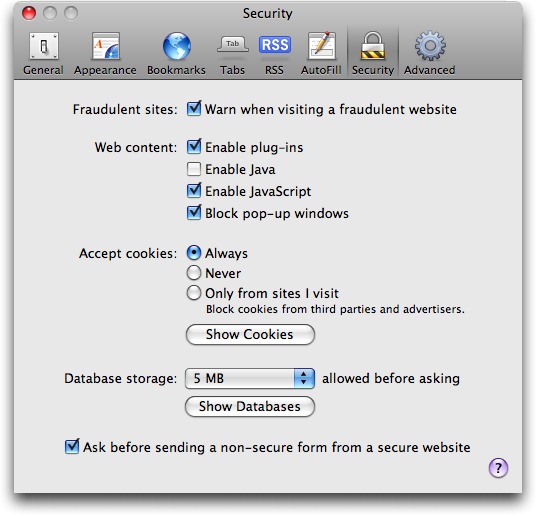
To disable Java in Safari, go into Preferences and disable “Open safe files after downloading.” Then click the Security tab, and uncheck “Enable Java.”
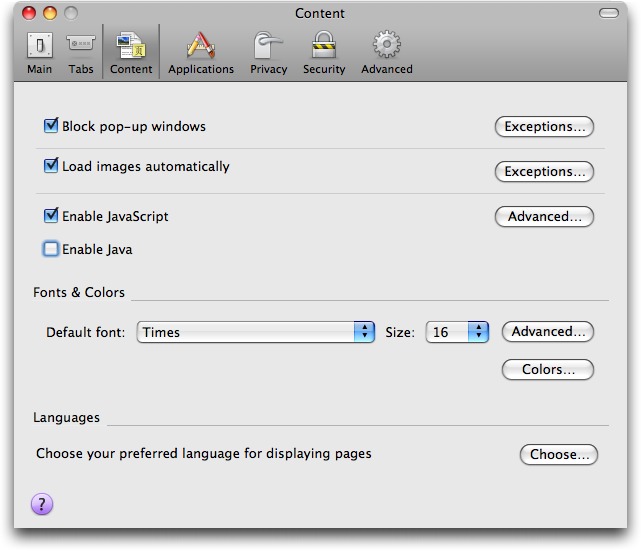
To disable Java in Firefox, select Preferences and then the Content tab. As with Safari, uncheck “Enable Java.”
Hopefully Apple will fix this soon, and stop leaving Mac users vulnerable to security flaws already fixed on other platforms.