Skype 2.8 Adds Screen Sharing, Per-Minute Wi-Fi
Add Skype 2.8 to the list of programs that let you remotely observe another computer’s screen. The latest Mac OS X-compatible release of the Internet telephony and video chat program brings remote viewing of a buddy’s screen, along with an interesting per-minute fee for Wi-Fi access at commercial hotspots. Both features are available in release versions only for the Mac; the current Windows 4.1 beta offers screen sharing.
Screen Sharing — Skype 2.8’s screen sharing lets you share your screen with a buddy, who can only observe, not interfere (consider the Prime Directive!). This may be enough for demonstrating a point or answering a question, but insufficient for technical support or collaboration.
Instead of requiring that you share an entire screen, Skype’s approach lets you share just part of a screen via a floating window that you can resize during an active session. You initiate screen sharing by selecting a buddy, and then choosing Share Full Screen or Share Selection from the Call > Share Screen menu. You can also initiate screen sharing if you’re already in a session with someone from the gear pull-down menu.
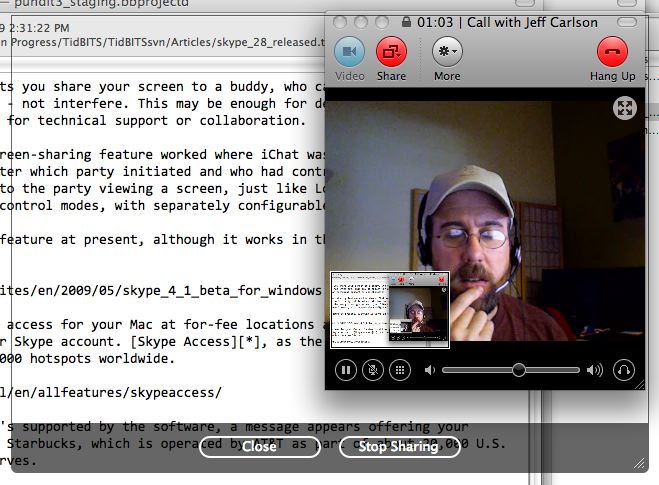
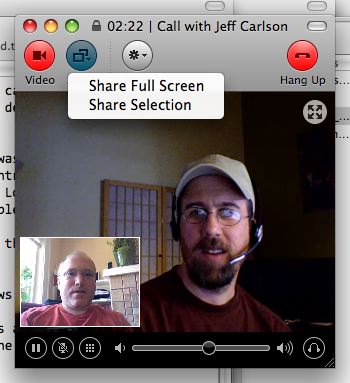
In our testing, Skype’s screen-sharing feature worked – even during the beta period – when iChat was incapable of starting a screen-sharing session no matter which party initiated and who had control. (iChat screen sharing always adds control to the party viewing a screen, just like LogMeIn Free for Mac. Timbuktu Pro has observe and control modes, with separately configurable permissions.)
Hotspot Access — Skype 2.8 also brings Wi-Fi hotspot access for your Mac at for-fee locations around the world, paid by the minute from credit in your Skype account. Skype Access, as the feature is called, works with what Skype says are 100,000 hotspots worldwide, enabled by Boingo Wireless.
When you’re at a hotspot supported by the software, a message appears offering you access. I’ve seen this pop up in Starbucks, which is operated by AT&T as part of about 20,000 U.S. locations the telecom firm serves.
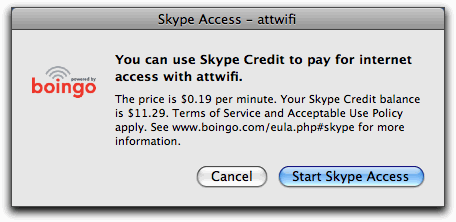
Rates are insanely high: in U.S. currency, it’s 19 cents per minute, or in the euro zone, 14 euro cents per minute (value-added tax may be added depending on country). That’s $11.40 per hour (plus tax), which contrasts unfavorably to day rates of $4 from AT&T throughout its U.S. network and as much as $30 per day in the most expensive European hotels. Hotels and airports more typically charge $8 to $15 per night. Boingo charges its direct subscribers $10 per month for unlimited access in North America, and $59 per month
for 2,000 minutes per month of usage worldwide. Neither plan requires a commitment beyond one month.
For casual use, such as 5 to 10 minutes of hopping on at a given location, Skype’s pricing relative to most day rates is far more worthwhile.
Skype also claims that voice and video quality have been improved in the latest release, but I haven’t seen a difference in my use.
Of course, Glenn took a screenshot when I had my eyes closed. I think he was waiting for just the right moment.
$0.19/minute is a little high. I was trying to think of when I would use this, but in the situations where I would use it, my cell phone would be cheaper.
It's per minute not per MB, so I can see cases in which downloading a few megs for $1 would be cheaper than using cell where it might cost $20 to $50!
"(iChat screen sharing always adds control to the party viewing a screen, just like LogMeIn Free for Mac. Timbuktu Pro has observe and control modes, with separately configurable permissions.)"
I'm using TEAMVIEWER and GLANCE on a daily basis for remote screen sharing with or without control. They are both excellent. TeamViewer has both free and paid versions; Glance is payware only.
http://www.teamviewer.com/index.aspx
http://www.glance.net/
[Nemo]
US Starbucks locations offer free wifi on the attwifi network if you've used a Starbucks debit card in the last 30 days. There's officially a two-hour, one-location limit, but I've never seen that enforced despite regular abuse of both parameters.
This amounts to free wifi if you just put on the Starbucks card what you intended to spend anyway.
It's not a debit card, just a stored value card. Interestingly, you can either make a purchase using the card or put a minimum of $5 on it.