Phone Amego: the Macintosh/iPhone Mind Meld
Imagine – and this shouldn’t be too hard for many people – that you have a Mac and an iPhone (or other Bluetooth-compatible mobile phone – I don’t have one of those, so I’m concentrating on the iPhone here). You’re sitting at your Mac, working away, and the phone in your pocket rings. You could pull it out, check the caller ID, and decide whether or not your want to answer.
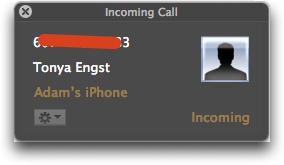
Or, if you had Sustainable Softworks’ new Phone Amego application loaded and paired with your iPhone, you’d just glance at a little pop-up window on your Mac to see who was calling and, if you desire, send the call directly to voicemail by closing the window. (This was a feature of Address Book in Tiger, but it went away in Leopard.)
Another scenario: You’re at your Mac and you need to call your colleague Mark. You could pull your iPhone out of your pocket, press the Home button, unlock it, tap the Phone icon, tap the contacts icon, scroll until you find Mark’s entry, and tap it to call. It’s not hard, but it is quite a few actions to perform (and it might be more difficult with a different Bluetooth phone).
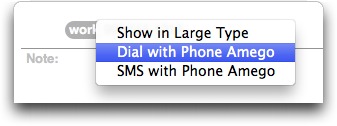
Or, if you have Phone Amego running, you could look Mark up in Address Book on your Mac, click the phone number label, and choose Dial with Phone Amego from the pop-up menu that appears. This too disappeared from Address Book in Leopard.
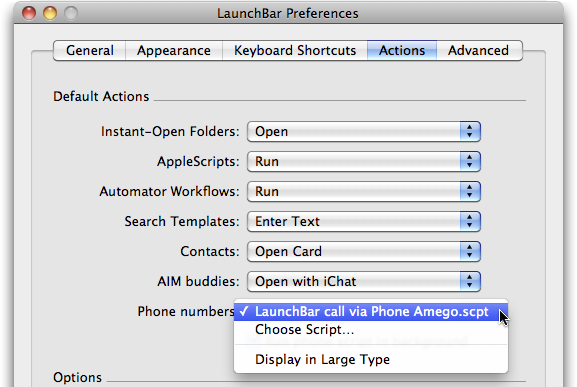
If even that seems like more work than is ideal, if you have LaunchBar installed, Phone Amego comes with a script that automatically dials phone numbers found via LaunchBar. Then the task becomes: press Control-Space to activate LaunchBar, type “Mark”, press Return, verify that Phone Amego is set to dial the right number, and press Return again.
Phone Amego has a few other features too. If you use Google Voice, Phone Amego can place calls through Google Voice so your Google Voice number shows up for the recipient via Caller ID. In this case, Google Voice actually calls your phone and the recipient’s phone and then connects the two calls together. You can also send SMS messages to one or more phone numbers via Google Voice for free.
You can also just dial any phone number directly by choosing Call from the Phone Amego menu bar item and typing the number in a pop-up window. Or, if you see a phone number in an email message or Web page, you can select it, Control-click the selection, and choose Dial with Phone Amego from the contextual menu that appears (or just press Command-Shift-D). This is implemented as a service in Snow Leopard; if it’s not on by default, check the Services list in the Keyboard preference pane’s Keyboard Shortcuts view.
A single screen of preferences lets you configure a few basic options, plus set some scripts that run when calls come in, when you answer them, and when they end. Included scripts can pause iTunes (I use that on incoming calls) and set your iChat status (I’ve tweaked that to set it to “On the phone” for call answer, and to “Working” for call end).

There are two other script execution options that could be interesting: In Range and Out of Range. This means you could have a script execute as soon as your iPhone comes within Bluetooth range of your Mac, and another run when you leave. I leave it as an exercise to the reader to come up with interesting ways of taking advantage of this capability.
My only problem with Phone Amego came when the Bluetooth pairing between my Mac and my iPhone became confused, preventing any communication between the two; I deleted the pairing and set it back up again, and Phone Amego started to work properly again.
Sustainable Softworks has brief FAQ entries on how Phone Amego compares with other phone-related programs, including ApiMac CallerID, BluePhoneElite 2, and Dialectic (for more on Dialectic, see Matt Neuburg’s review in “Dialectic Simplifies Dialing Any Type of Phone,” 2008-04-10). I haven’t tried those programs, so I can’t comment on them, other than noting that ApiMac CallerID doesn’t work with the iPhone, whereas the other two do offer iPhone compatibility.
Phone Amego 1.0 costs $20 and is a 913 KB download. You can try it for 21 days for free, so if you have either an iPhone or a Bluetooth-savvy mobile phone and want to make it easier to use from your Mac, it’s worth giving Phone Amego a try.
Some of us would like an application that'd let us make calls on our computer through systems such as Skype and MagicJack and carry on the conversation on a WiFi/Bluetooth linked iPhone or iPod/touch. And if it integrates in Google Voice, that's fine too.
This scheme may save a little trouble, but it's still burning up the cell phone minutes and not solving the problem of spotty cellular coverage inside buildings.
Will the Skype app for iPhone do some of that, at least? I'm not sure if an independent developer could do something like that with the Skype applications and infrastructure.
If you don't have good cell phone reception at home, you can use Google Voice to ring both your cell phone and home phone at the same time, and answer whichever one is more convenient. If (when?) Apple allows incoming VoIP over WiFi on iPhone, you'll be able to ring that as well to solve just the problem you describe.
Dialectic has a ton of options for working with Internet phone systems including Skype.
Cool! This is one of those ideas I've had in my head, (at least the one about dialing straight from Address book) so it's nice to see it being made a reality.
I used to have a cradle for my Nokia phone that when inserted activated call forwarding (to my land line) and deactivated it when removed. This 'in range' script trigger looks good to get me the former but i am open to suggestions on the latter!
Does anyone know how to set something up to be able to dial from within Quicksilver (much like it seems to have for LaunchBar)?
Version 1.0.3 of Phone Amego includes a user contributed script for that in the Phone Amego Scripts folder. Enjoy!
I use Dialectic software with a Vonage system at home or anywhere my MacBook Pro has access. I can dial from anywhere on the Mac, including the clipboard. As well, it will parse even alphanumerics from a highlighted paragraph anywhere. Awesome. It meshes perfectly with Vonage. I would never go back to Skype. I don't need a phone number that looks like I'm calling from Nigeria or someplace. With Vonage I have two main lines/numbers and an 800 toll-free, and I'm looking at 34 bucks a month to call anywhere in North America plus 5 or 6 countries in Europe, 24/7/365, no "minutes" or "after 9 BS to keep track of, at all. Skype? Ya gotta be kiddin' me.
Brian
You clearly are not up to date with the skype offering, I can do all you can and display my own cell number for a lot less than 34 bucks a month.