Apple TV 3.0 Adds Focus on Your Content
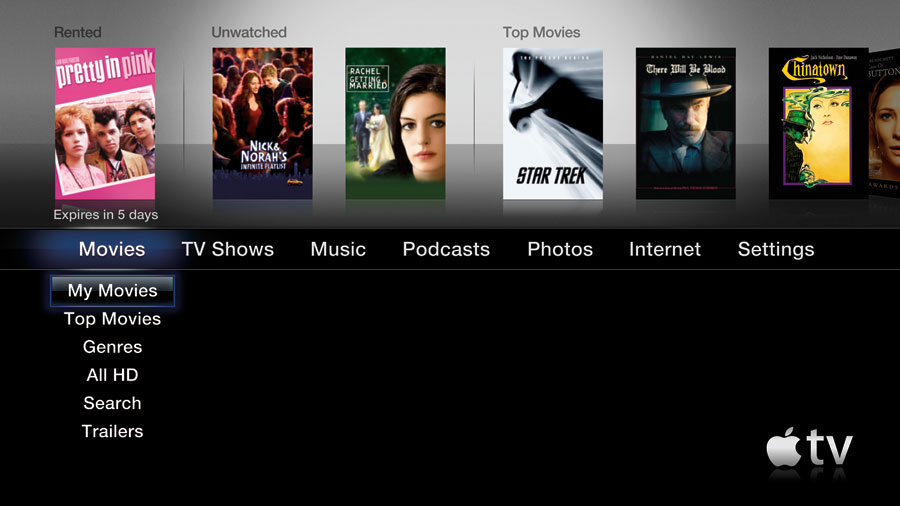
Apple has introduced version 3.0 of its Apple TV software, revamping the main menu with a new look and – finally – a new focus. The redesigned top-level navigation now features links to your content (My Movies, My TV Shows, etc.) at the top of each section menu; in the previous version, the focus was on Apple’s paid offerings.
Categories are arranged in a single line, left to right. Highlighting a category displays options below, like a drop-down menu. The top third of the screen features thumbnails of content: for example, when the TV Shows category is active, your unwatched episodes appear alongside top shows from the iTunes Store; press the top button on the Apple remote to highlight one of the items, and then press the Play button to view it.
A new Internet menu item leads to YouTube videos and, new to the Apple TV software, Internet radio stations. The stations are arranged by genre, as you’d find in iTunes. When you press and hold the Play button during playback of a station, you can choose to mark it as a favorite, which then appears at the top of the Radio list.
Other new features include photo syncing of iPhoto Faces and Events, Genius Mixes, and support for iTunes LP albums and iTunes Extras movies. However, if you’ve previously purchased items with those expanded features, they need to be re-downloaded to work with the Apple TV; Apple says they will download automatically in iTunes.
Aside from the top-level navigation, and a switch to Helvetica as the default font, the rest of the Apple TV interface is largely unchanged.
The Apple TV hardware remains the same as the original model introduced in 2007, although now containing a 160 GB hard disk. A new Apple TV costs $229.
The Apple TV 3.0 software update is free for current owners, and is available only via the Apple TV itself (go to Settings > Update Software).
Though the improvements in Apple TV 3.0 are welcome, they’re unlikely to cause anyone to decide to buy an Apple TV, meaning that the Apple TV remains a hobby for Apple, and merely another small step as Apple gingerly pushes its hardware into the living room (the previous small move was making the latest models of the iMac capable of operating as external monitors for Blu-ray players, game machines, and the like).
iTunes 9.0.2 and Remote 1.3.2 — Apple also released iTunes 9.0.2 and Remote 1.3.2, which add support for the new Apple TV features. iTunes 9.0.2 also offers a new preference to use a dark background behind the Grid view, located in the General pane of the iTunes preferences.
iTunes 9.0.2 is an 85.82 MB download, and is available via Software Update or as a direct download. Remote is free and available from the iTunes Store, and is a 1.6 MB download.
I don't think AppleTV 2.X had this feature before, but 3.0 also supports HD in the YouTube videos section.
I guess the real question for me is how well does the AppleTV work with non-Apple content. Does it play avi files? mkv files? MPEG-2 streams saved off a QAM tuner?