Ins and Outs of the 3G iPad AT&T Service Plans
The 3G iPad is in buyers’ hands, including mine and those of TidBITS Managing Editor Jeff Carlson, giving us a chance to drill down into the details of the two simple mobile broadband service plans that AT&T offers. Terms of carriers outside the United States are still unknown.
The two plans are based on consumption of incoming and outgoing data via 3G over a 30-day billing cycle. For $14.99, you get 250 MB; for $29.99, you get unmetered data – a true unlimited offering. Both plans also include unlimited access at AT&T’s 21,000 domestic Wi-Fi hotspots. Each plan automatically renews unless you cancel it, but no long-term contract is required.
If you don’t use the full 250 MB in the first plan during the 30 days, unused bandwidth simply expires; it does not roll over to a subsequent month. There is no penalty for cancellation and you can cancel at any point after a given 30-day period begins, up until the moment that your credit card is charged. (In fact, AT&T says you even have a two-hour grace period after the card is charged to cancel.)
The Cellular Data tab in the Settings app – which appears only on the 3G iPad model – is where you control all your 3G data settings. There is no switch to flip from 3G data down to the older 2G EDGE standard, a feature in the iPhone 3G and iPhone 3GS that’s used to improve battery life or establish a more reliable cellular connection. The iPad does fall back to EDGE if 3G isn’t available (and then down to GPRS in the absense of EDGE, if necessary) – there’s just no manual control for switching it yourself. I have a query in to Apple about this, but it’s likely because using an iPhone for voice over 3G exacts a much higher battery toll compared to the same call over 2G because of the continuous nature of the call, even though it’s
broken up into data packets. Sending pure data over 3G exacts a lower toll than voice.
You don’t need a network connection via Wi-Fi in order to sign up for a cellular plan, which is rather nifty; you just have to be in range of an AT&T network in the United States. With the cellular data connection active, signal strength bars and a network operator appear in the upper left whether or not you have already signed up for a service plan. (The top figure shows an active Wi-Fi connection with AT&T service available; the bottom figure shows the network status after I activated a 3G plan and turned Wi-Fi off manually.)


(One commenter found that, in former Alltel territory in Montana, even though his iPad shows AT&T in the upper-left corner, he is unable to sign up for a plan. Alltel was a regional CDMA carrier purchased by Verizon to acquire customers, but a number of rural markets were spun off to AT&T, which is using the licenses to offer GSM service.)
To set up a data plan, you tap the View Account button. You’re presented with a long screen in which you enter your name, a phone number at which you can be reached (it doesn’t have to be a cell number or an AT&T account), an email address and password for an account, and credit card billing information. You also select which of the two plans you want. You cannot pay for service except with a credit card; Visa, MasterCard, American Express, and Discover are accepted.
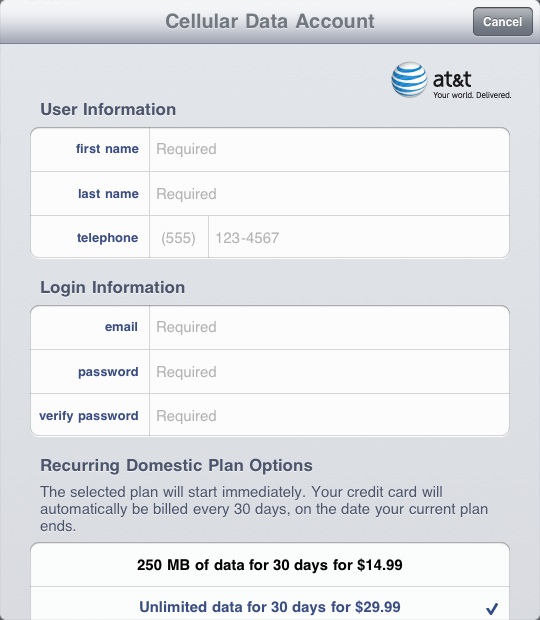
A few days after launch, the sign-up screen was revised to allow a separate address for credit card billing distinct from the service address. The service address, which is optional, must be in the AT&T service area. This change lets those who have a credit-card bill sent to a post office box obtain service.
The account you create is fresh: AT&T doesn’t recognize existing Apple IDs or even AT&T accounts. Your email address is used to send you receipts and service updates, along with warnings about data usage on a 250 MB plan.
After you enter all the required information and click Next, you must accept AT&T’s terms of service. Click Agree, and the next screen shows a summary of charges, and the option to buy insanely expensive international service, too. Click Submit, and a final screen tells you it will take a few minutes for 3G service to be activated. For me, on what was probably a busy day for activation, it took about five minutes. A push notification appears on screen when it’s done.


Just as on the iPhone, you can use Airplane Mode at the main Settings level, and a Cellular Data switch in the Cellular Data settings to disable the use of the 3G radio. Airplane Mode disables GPS, 3G, Bluetooth, and Wi-Fi radios, but you can turn Wi-Fi back on manually – useful in planes in which Wi-Fi is available for Internet access.
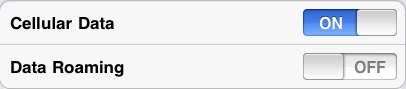
It wasn’t clear to me before the 3G iPad was released how it would work on networks outside a carrier’s home territory. With the availability of international plans and a Data Roaming switch (to disable non-home network roaming) in the Cellular Data settings area, it’s clear that an iPad will try to use any available network with which AT&T has a relationship worldwide.
Jeff and I both signed up initially for 250 MB plans in order to see what happens when you get close to limits and how practical that amount of data is. As I noted in “Can You Get By with 250 MB of Data Per Month?” (2 February 2010), I found I was using nearly 300 MB of 3G data on average each month on my iPhone 3GS in my first several months of use.
Jeff tested Netflix streaming, which is allowed over 3G, and managed to burn through 250 MB in about an hour of streaming a movie, which is a little surprising. At a streaming rate of as fast as 1.5 Mbps over AT&T’s network, Netflix could have pushed out nearly 700 MB. (Using some bandwidth testers, I managed to burn through 25 MB in about five minutes.)
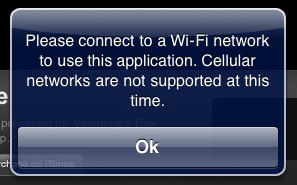
Other streaming video apps aren’t allowed to use the 3G network. Jeff tried ABC’s app, and the iPad popped up an expected error. I wonder if Netflix’s app will be pulled and relaunched with a Wi-Fi only restriction? It wouldn’t take many Netflix users to have a huge impact on AT&T’s data network.
Once you’ve paid for a data plan, you can make changes to it by returning to the Cellular Data settings and tapping View Account. In a colossally irritating decision, AT&T requires that you log in each time you want access to account information or to make changes. There’s no password caching, even over a period of seconds, nor any way to store a password.
When you log back in, you can see various data, such as the billing period, and the amount of data consumed (according to AT&T’s records). Jeff found that AT&T’s information about data consumed has a time lag of 30 to 60 minutes (though that could have been due to first-day traffic as tens of thousands of people all activated their 3G iPads); the Usage pane in the General settings screen shows what the iPad measures at the moment.

AT&T also displays the phone number assigned to your iPad – that’s right, a phone number. This is presumably because there has to be something in AT&T’s database that’s associated with billing. I tried calling Jeff’s iPad number, and AT&T played a recorded message that explained the party I was calling was unable to accept calls at this time. Or perhaps ever.
You can also make changes to your plan from the Add Data or Change Plan screen. Tap that item, and you’ll see something different depending on your current plan. I opted for 250 MB to start with, so I was offered the chance to buy another 250 MB of data, change to unlimited, or cancel the plan. I presume you see an option to move down to 250 MB or cancel service if you’re already on the unlimited plan.
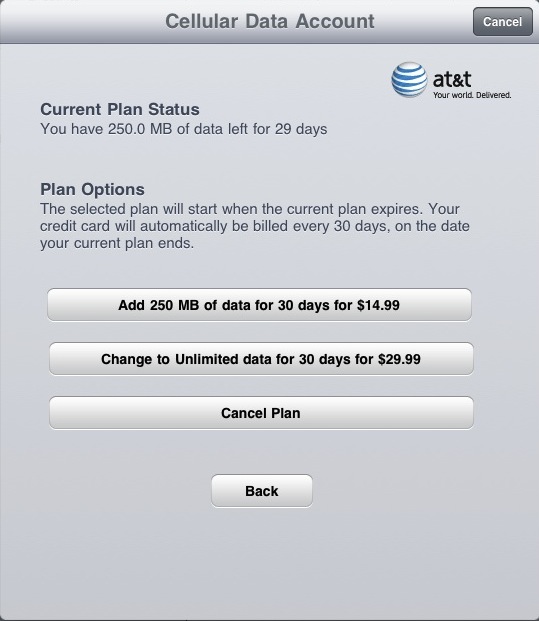
Both options in the screenshot above are slightly misleading, but not in AT&T and Apple’s favor; users might be more likely to make choices that would increase revenue if the results of actions were explained better. While the buttons say one thing, the text above them is more clear: “The selected plan will start when the current plan ends.” This includes cancellation.
For instance, if you “Add 250 MB of data,” and you’re already on the 250 MB plan, no change is made if you don’t run through 250 MB of data within 30 days. It simply keeps you on the same plan. If you run out of data within 30 days, however, the next 250 MB chunk is added to your account, and the billing period resets to count 30 days starting from the moment you switch over into the new data pool.
Likewise, the unlimited plan begins only when you either run out of data on a 250 MB plan before 30 days is up, or the next 30-day cycle starts, whichever comes sooner.
The cancel plan option can work that way, too, but you have two behaviors to choose from. When you tap Cancel Plan, you can either delete the account you used to set up the plan immediately, which disables service, or you can delete it later, which keeps service active until the end of the period or, on a 250 MB plan, earlier if you run out of data within 30 days. (“Later” isn’t quite the right word: AT&T’s text explains that dormant accounts are deleted after 60 days.)
The former option kills any remaining days or data left on your current plan. AT&T doesn’t offer a pro rata refund, so you’re simply giving that service away. The latter option cancels the automatic renewal, but leaves service in place. At the end of the current data usage or 30-day cycle, service halts.
When I tested canceling my service with the cancel-later option, AT&T sent a confirmation email a few hours later with just that language: “You have chosen to cancel automatic renewal of your 250 MB of data for 30 days for $14.99 plan. If you wish to re-establish service, please go to Settings on your iPad to select a new plan.”
If you use 3G service on an iPad intermittently (with more than 60 days between uses), you’re going to wind up creating an account many times, it seems. Here’s hoping AT&T can cope with the same email address being used each time.
The international data plan rates for the iPad are precisely the same as AT&T offers for other phone packages, and aren’t a gotcha – these options are a one-time, 30-day period purchase and don’t renew. You can even pick the start date at midnight Eastern Time (even if you’re in a different time zone) of at least the next day. The usurious rates run from – get this – $24.99 for 20 MB to $199.99 for 200 MB. It remains to be seen if it will be possible to buy a cheap pre-paid MicroSIM when travelling in other countries. (To be fair, AT&T is paying enormous fees to its international partners, too, just not that enormous.)
Apart from the international data plans, AT&T’s 3G service options are rather remarkable, with unusual elements related to pricing, extending service, upgrading, and cancellation that make it flexible enough for occasional use but affordable for regular use. Careful about that streaming video, though.
[Editor’s note: The behavior around halting service was revised after receiving more information from readers and a commenter about the immediate cancellation option. Information about the new service address portion of the sign-up process was also added.]
My Sprint mifi has a phone number associated with it. I assumed it was required on the cell network, like a MAC address on a network card.
One of the side effects of the fact that our whole data network is built on top of the pre-existing phone network is that *anything* that connects to either a cell network or the landline network needs to have a phone number, whether it's ever going to receive phone calls or not. Every ATM machine has a phone number, for instance. This is part of the reason why there has been such a proliferation of area code overlays in the last decade.
Are the buttons or context descriptions any different between "Change Plan" and "Add Data." My interpretation is that the screen you showed was for Change Plan, why there was a Cancel Plan button. I would expect those results from such a "change" opportunity, so the user gets what they originally paid for.
Does the Add Data screen show exactly the same text?
Sorry for the confusion: the label is "Add Data or Change Plan," not two separate buttons. As I say, the language here is a little confusing for simple options. I've added a screen capture that shows that strange menu option to make it clearer.
2 questions:
1. What degree of connectivity is required *when establishing/activating the account*? Is it possible to turn 3G on if you do not have a wireless available signal?
2. You note that the iPad lacks a control to switch to 2G-only. Is it capable of "doing" data over 2G if that is the only signal available?
2 answers, wrapped in one:
When you turn the iPad 3G on, it automatically establishes a connection to AT&T's network, provided the signal is there. I also saw that after my first sync to set up the device, my connection was initially on Edge. So, yes, the iPad is capable of working on Edge and also GPRS (an O icon appears in the status bar).
This was all before I had set up an account or added a data plan. So there's a live connection there; it's the software that dictates whether you can do anything with it.
And look at that, I didn't actually answer your first question.
I just tested, and with Cellular Data Off, but Wi-Fi On, it is possible to connect and set up a cellular data account, add a plan, etc. in the Cellular Data settings.
I have a related (or perhaps the same) question... Is it possible to set up a new 3G account without access to a Wi-Fi signal? I didn't bother to test this when I activated my 3G iPad. I'm thinking about giving an iPad to my Wi-Fi-less mother.
P.S. This is a terrific article.
Yup: the AT&T connection is active and displayed even if a service plan isn't active. It's very clever how they did this. (I'll update the article to make this clearer.)
If your credit card billing address is a P.O. box ATT won't let you sign up to any data plan! I've used this same card to buy cameras, computers, iTunes and Amazon stuff.
That's fascinating. I'm just surprised that one can't link to anything else to pay, including using an existing AT&T account.
I just went through this issue. My Credit Card co allowed me to temporarily change my mailing address to my street address. I think I successfully set up my ATT account.
I live in Montana, where AT&T currently has no "presence" (although Alltel, my cell phone carrier, is being acquired by AT&T ... sometime). I have been unable to activate an AT&T plan with my iPad 3G, although I show AT&T "bars" on the iPad screen. Every time I try, it asks me to validate my (credit card billing) address. Discussions on Apple's Boards seem to think that activating an AT&T data plan is NOT possible if one's credit card billing address is outside of an AT&T coverage area. Is this true? Did I miss something in Apple's promotion of the iPad 3G?
It could be. AT&T won't let you sign up for certain services if you live outside its coverage; and it will cancel your service if you use too much roaming outside its service area. Big hidden problem for those in certain places - like you, and a lot of New Englanders, and I think northern Michigan, too.
I'd be curious what AT&T tells you when you call them.
Does the iPad actually say AT&T at the top, or does it say Alltel? I would imagine that if you're not within range of AT&T's network, you can't use it. Otherwise you're roaming on another carrier's network. Have you tried turning on the Data Roaming option in the Cellular Data settings?
I've not heard of anything specific to your situation, but it's always been my impression that you need to be within AT&T's coverage to use their data service.
It actually says AT&T ... With five bars. I tried your suggestion with the Data Roaming on, but still got the same response requesting validation of my credit card billing address.
I guess I'll just have to wait until the Alltel/AT&T switchover is done and hope for the best!
I'm pretty sure that it's Verizon that has aquired Alltel.
AT&T is buying some of Alltel's assets from Verizon.
Alltel uses GSM; Verizon CDMA. Verizon was required to sell some of its rural markets to other firms and AT&T bought a bunch with a total of 1.5 million customers. That already happened, but perhaps the networks aren't yet integrated into AT&T's billing system.
Hmm. Alltel definitely was CDMA here in Richmond, VA. I didn't realize they used GSM anywhere.
You're right - I was confused. AT&T got frequencies, and will migrate customers, as I understand it.
My understanding is that AT&T is buying Alltel assets, from Verizon, in 15 markets that both Verizon and Alltel had a presence ... Montana is one of them. So we, here in Montana, will become AT&T when the dust settles from the acquisition.
UPDATE: Following info posted on Apple's website (Discussion Forums), today, the AT&T sign-up window on the iPad includes an option to select "usage" location other than your credit card billing address. Choosing a "usage" address, located within an AT&T service area, allowed me to sign up for a data plan and everything works! At my home location, where there is no AT&T service area, I am using an AT&T "partner". This should work fine because I primarily want the 3G capability for when I travel.
Yes, this is nice and new since I looked on Friday.
Quick (non-AT&T) question. My MacBook Air allows me to share its internet connection (say from a USB cell modem) via WiFi. Is there any way on a 3G iPad to share its 3G connection in a similar way?
No, there's no tethering option. If you want to do that, look into getting a MiFi or other portable cellular modem that acts as a Wi-Fi hot spot.
No, unfortunately, and Steve Jobs himself seemed to say in a reply to one email that it wasn't going to be available. Which is too bad: tethering (of course, at an extra cost) would be a great use case for iPad.
OK, I figured as much (although I *thought* the SJ email was about tethering a WiFi iPad to a 3GS iPhone).
I was hoping I could use a 3G iPad to replace a bag full of devices I currently travel with (including a USB cell modem and Cradlepoint "personal hot spot"). Crum...
As a UK resident, I'm curious about the SIM card that comes with the 3G. Is it what's called a 'micro-SIM'?
If so, if I bought a UK iPad 3G might I be able to get my hands on a cheap AT&T micro-SIM card that I could put in the iPad when I go to the US that lets me use AT&T's service and domestic tariffs?
Great questions. MicroSIM is a new format that uses precisely the same technology but is just smaller. It's not in wide use, but there's no particular reason it's not.
Given that Apple will be selling the 3G iPad worldwide, carriers are probably producing microSIMs by the millions.
I don't know what AT&T's policy will be about offering microSIMs for "rental" or what have you. AT&T does sell SIMs that you can fill with value, but the 3G iPad plan is so distinct, I'm not sure how this will work.
Any AT&T store should be able to provide you with a sim ( they are all switching to full/micro all-in-one sims) then just insert into iPad and sign up for service. Should be no troubles. People who travel outside the US shoud be aware of that as well... dont pay AT&T to roam!!!
Is there a full-sized SIM adapter or something? That's good news.
Not entirely clear is whether, when you cancel, it cancels only the "renewal" or if your remaining time/data is cancelled as well.
For instance: I sign up for $15. Over the next 24h I use 50M. I cancel. Can I continue to use 3G for the remaining 29 days and 200M?
Cancel means "cancel renewal." I may tweak the article to make my discovery process clearer. When you use the cancel options on the 3G iPad, the text doesn't make it sound exactly like you'll continue to use the remaining service. The follow-up email I received after canceling auto-renew from AT&T was far more straightforward.
Because service is non-refundable after being charged, you can't cancel it. You either run out of days or MBs, depending on usage or plan.
The "cancel" text should state "cancel auto-renew," in my opinion.
Thanks so much for posting all this. Very appreciated.
Have you checked yet to see if GPS performance and accuracy is much improved over the wifi-only model
Only briefly. There's no GPS receiver in the Wi-Fi only model, and there is one in the 3G model. It works as I'd expect.
I magnified my house in Google Maps-Satellite View with my new iPad WiFi+3G, and the blue dot followed me around the house. That's definitely GPS working, not location using cell towers. I was very impressed with the new iPad's GPS capability, which is why I waited for it. I don't plan to use its 3G capability since I have an iPhone.
I'd love to have a follow-up on this post, explaining whether or not it's possible to switch out micro-SIM cards when one goes overseas and use another carrier's network directly. 200 bucks for 200 MB might be a fair price from the carrier's perspective, but it seems like highway robbery to me. Given that the 3G iPad is sold unlocked, I wonder whether the following scenario is possible:
You buy a 3G iPad. You have the $30 unlimited plan for a while. You are traveling to Germany, so you cancel the $30 unlimited plan with AT&T. You take the plane to Germany, and when you get off the plane you get yourself a micro-SIM from T-Mobile. You pop the U.S. AT&T micro-SIM out, you put the German T-Mobile micro-SIM in, sign up with T-Mobile in the same way you did with AT&T (and make sure you don't auto-renew). And you cancel the T-Mobile plan when you go home, and renew with AT&T.
I want to know whether THAT'S possible. If so, that would be really great.
It should be possible, but certainly not today. And when it becomes possible (when many carriers have microSIM cards available), carriers may choose not to offer this, even though it's common for cell phones.
I'll bet this will be complicated by fact that most carriers won't let you buy services without a local billing address, which obviously most international travelers do not have.
Are you serious? Prepaid SIMs are _the norm_ in most countries, no billing address (or even name) required.
Walk in, plop down cash, walk out with SIM. Done and done.
For data or voice service? I'm not versed well enough in non-US/Canada options for raw SIMs.
I'm thinking the option of having you enter your info each time may be a way of safe guarding you in the event your iPad gets stolen.
You don't want someone to have access to your credit card and other information by just going to your account and having your personal details available.
I would feel much better carrying one around knowing that if i leave it behind or someone steals it those sensitive information doesn't readily becomes becomes available.
Of course, but you can protect your iPad (or any iPhone OS device) with a PIN code; and many software packages on mobile and desktop devices can cache a password for a short period (minutes or hours) depending on your preferences.
I'd suggest using a PIN lock on a 3G iPad, and using MobileMe for Find My iPad to help recover it in case of theft.
I am bought a couple of AT&T gift cards to give as a gift for buying AT&T iPad 3G service. Seems AT&T doesn't take AT&T gift cards (or Apple) on the iPad. Hopefully I can pay my AT&T bill with them.
You complain that "In a colossally irritating decision, AT&T requires that you log in each time you want access to account information or to make changes. There's no password caching even over a period of seconds, nor any way to opt to store a password."
----
It would most likely be far more irritating if you iPad were lost or stolen, and the 'Finder' subsequently would have access to all your personal billing information. I think the decision to require fresh logins was an appropriate erring on the site of caution, for both AT&T and Apple.
Your address is stored, but other personal information isn't available. The only actions are upgrade, renew, or cancel (depending on plan), and purchase international data. So someone could accomplish some mischief, but not run off with the farm.
My point here is that it's irritating to have to log back in five seconds later. The iPad's PIN lock could be used as a tool to prevent access to the iPad on top of the AT&T password lock. Or you could have a password timeout. Lots of ways to do this without requiring a password login seconds after exiting the screen.
Apparently microSIM cards are contact/electrically compatible with the regular SIM card electrical contacts -- so the next thing would be to see if there are appropriate tools to cut a SIM down to microSIM size, and if it works in iPad.
This would be needed until worldwide carriers adopt microSIM for data plans, and should be easy to test.
Many international carriers (particularly in Asia) have very competitive plans that include unlimited 3G for anywhere between $20 - $30 a month. This would be a far better choice for international travelers.
Some sites have instructions on cutting down SIM cards, but the iFixIt folks don't believe the contacts match perfectly from SIM to microSIM.
Which non-US carriers have unlimited plans? It's more typical that outside the US you have strict data limits or caps on smartphone service (as on laptop mobile broadband).
At the very least, o2 in Germany has an "unlimited" plan for under €30/mo (I think it's full-HSDPA speeds for the first 5G down, then it goes to 64kbps down for the rest of the month, but it really is unlimited.... just not at full-speed).
Fascinating. T-Mobile just launched a similar 5 GB plan here, which is unique in the US. After 5 GB, T-Mobile throttles to an unstated speed at its discretion.
" I tried calling Jeff's iPad number, and AT&T played a recorded message that explained the party I was calling was unable to accept calls at this time."
---
It would be interesting to put that SIM into a phone, to see if it actually has phone service in a device that supports it - obviously, there's no real phone in the iPad, so the SIM would not provide it, but what if it were in a real phone?
Except, good luck finding a phone that will accept a micro-sim card. They're not at all common. But yes, it would be a fun experiment.
I tried. Same result. The caller gets a message that you aren't available.
Apps are only allowed to stream over cellular data if they offer a low bandwidth stream in addition to a high bandwidth. Netflix is relatively slow because it's serving up a low bandwidth stream. ABC doesn't run because that app doesn't offer such a stream. The netflix app won't be pulled because it plays by the rules, hopefully other apps like ABC's will be updated to offer 3G friendly streams
You mean ATT's rules. It shouldn't be up to the network carrier what types of streams that I choose to view on my device if they're selling me an unlimited plan.
That's like Apple saying that you can't run Photoshop on a Mac Mini, because you didn't spring for a Full-size computer. It's bullshit of the highest order.
Hard to believe Netflix is streaming at a slow rate if it can burn 250 MB in an hour, as Jeff found.
Does data used on an AT&T WiFi hotspot count against the 250MB cap? Apple's website isn't clear about how that works.
i haven't visited an AT&T hotspot yet to test this out, but no, the 250 MB is just data transferred via the cellular network. When you're on Wi-Fi, whatever network it is, that's unlimited. The tie-in with AT&T is that having a 3G iPad with an active data plan gets you free access to hotspots that would otherwise cost money to use.
I can confirm that AT&T doesn't meter or limit hotspot access. (Most of AT&T's hotspots are free - 12,000 are McDonald's, which is no longer charging - or quasi - 7,000 are Starbucks which require a simple $5 purchase on a Starbucks Card to activate two free hours per day.)
If you activate a 250mb plan and decide to upgrade to an unlimited plan, do they charge a full $29.99 or just the difference? Is there a way to change plans mid-cycle without paying more than necessary, is really what I'm interested in knowing. Thanks!
The unlimited plan goes into effect only when your current plan ends. So it's not the difference; it's the full rate either when 30 days runs out or you run out of data. If you run out of data before 30 days is up, a new 30-day period starts up.
I live in Australia but I'm travelling to the US on Friday. I'm hoping to purchase a 3G iPad (if there are any available!). I was hoping I would be able to sign up for a AT&T account to get 3G access while I'm in the US but after reading this article and comments I'm wondering if my VISA card with Australian addresswill be accepted? Has anyone tried to sign up with an non-US credit card?
I believe you will not be able to, but call AT&T.
Will do when I get to the US.
I did find one thread on the Apple Discussions where someone had worked around a PO Box problem with a Pre-Paid Visa card. That might be an option for me.
One of the chief attractions to me of the 3G iPad would be the ability to get a decent priced 3G on the semi-regular occasions I visit the US so I hope Apple/AT&T can sort out a more seamless solution.
I was thinking of doing exactly the same thing with a UK card and also thought a Visa gift card may be a work around if they block overseas addresses.
Would be great if you could post how you get on.
Total crap how they don't apply the $15 when you change to unlimited. They should keep the current date for the plan and upgrade it to unlimited for another $15. So much for AT&T doing the right thing.
AT&T doesn't "apply" $15 because you use the entire $15 plan before you switch as noted elsewhere in the comments and the article.
The switch to an unlimited plan only happens after you've used 250 MB or 30 days has passed, so you get the full value offered.
It should work exactly like a txt messaging plan. If you want to switch to unlimited, it does it for the current billing cycle. With the iPad, you sign up for a month of service, not an amount of data. I should be able to say, for this month of service, change to unlimited, pay an extra $15, and keep going with my month of service. Instead of taking $30 from me, AT&T takes $45. Exactly opposite of what they do for txt messaging plans. Now I have to sign up for the $30 plan, even if I think I might not need it, for fear of being penalized later for switching to unlimited.
No, with the $15 plan you sign up for an amount of data, not a month of service. 250MB, to be precise. You might use it up in 30 days or in 3 hours, but when you do, you switch to the unlimited plan from that new billing date.
I'd argue it's a little trickier than that. If you're a light data user, it seems like you're signing up for a cheap 30-day plan. If you're a heavier data user, than you've signed for "use 250 MB in under 30 days."
It does stink if you run through 250 MB in the first day or so. Then you are paying nearly $45 for 30 days service if you switch to unlimited.
However, if you run through 250 MB in 15 days, you wind up paying $30 for 30 days ($15 for the first 15, then half of $30 for the next 15, half the cycle).
In fact, if you use less than 500 MB per month, having the flexibility to spend $15 or $30 is better than being required to spend $30 for unlimited.
Most other carriers (T-Mobile becoming a notable exception) require contract commitments, have more limits, and charge more for service on full-fledged devices. I think AT&T has struck a fairly decent balance here given the heavy use the iPad will have.
I wouldn't be surprised if an average iPad user with an unlimited plan consumes 5 to 10 GB per month instead of the 500 MB that an average iPhone user apparently sucks up.
I live in Nome, Alaska. Unfortunately, to sign up for an ATT plan, you cannot use a PO box as the billing address for your credit card. If you do, it won't go through. Huh? What's with this?
What is required is a valid street address. What is a valid street address according to ATT? It is an address registered in the USPO database (and remember US P.O. boxes can't be used).
In Nome, USPO has no home delivery. Everyone gets a PO box. This is the same throughout rural Alaska. Since the USPO does not do home delivery, there are NO VALID street addresses in Nome because the PO doesn't have a database, so even if you change your PO address to your street address for billing on your card, you will still not be able to sign up for an account.
So, if your billing address on your credit card is a PO box, you won't be able to sign up. In rural Alaska, you just won't be able to sign up at all.
I am not being flip, but have you thought about emailing Steve Jobs ([email protected])? He or his staff is responding to a lot of email these days. He might just do something about it. Or at least tell you, "We're working on it."
I remember this being an issue with the original iPhone, too. I think that if you call AT&T, they can work something out.
Hi, I called ATT. They were clueless. I spent over half an hour with the ATT person, and they even went offline to get more information, but they still didn't understand the problem or have a solution for me. They could not grasp that I did not have a Valid street address (though the city of Nome does think it's valid).
Sigh. I'm surprised they didn't ask how you could be making the call, because obviously no one in Nome would have phones.
ET, Phone Nome! (Sorry, couldn't resist.)
I was making the call on my ATT cellphone. For it, I can pay my charges using my credit card with a PO billing address. So, they could verify I had an account and had been paying for it, but they still have the special restriction not allowing PO boxes to be used as billing addresses on the credit card you use to pay for your 3G iPad accounts for some reason.
I selected cancel like you said to stop the auto-renew and got this:
our data plan was cancelled at your request or because it has been inactive for an extended period of time.
If you wish to re-subscribe, please visit Settings on your iPad.
Thank You,
AT&T
Now I have no 3g any more!!! I paid 30 bucks for one day!!!
Call AT&T. I expect you can get this worked out.
Did you have two options: cancel immediately or cancel later? If you chose immediately, it may be the problem.
The user interface says "change plan" - not "cancel current plan and start a new one."
Question:
I wonder whether iPad 3G that is sold in US has SIM lock or not? In other words can I take it to Europe and put my own (micro)SIM card?
Jobs said it's unlocked, and it appears to be unlocked. The real question is the availability of microSIMs from other carriers, and the interface (if any) to those.
SIM + scissors = microSIM
I am going to purchase an iPad 3G in Canada which comes with a Rogers (a carrier) Micro Sim Card. When I head to the USA for college later this year...will I be able to buy an AT&T chip knowing that the iPad is an unlocked device...could it be a problem?
Yes. I don't know if AT&T has set up a streamlined way to get a micro-SIM from them, but you can already purchase plans with a plain SIM. I imagine after the iPad ships outside the United States, AT&T will start getting requests and be ready to deal with it.
You may need a U.S. address on a credit card in order to get an AT&T account, however.
Can I use my iPad while traveling outside the country?
You can connect to Wi-Fi hotspots anywhere in the world. For 3G service, purchase a micro-SIM card and service from a local carrier at your destination, or check with your home carrier regarding international 3G usage.
I picked this up from apple.ca and this hopefully gives me hope. Yeah I'm aware of this tacky situation of needing a U.S. address for setting up an account. Will somehow figure out something!
Thanks so much for your response!