Apple TV Connects Macs and TVs
Although the big news at Steve Jobs’s Macworld Expo keynote was the iPhone, Jobs also introduced the Apple TV, previously codenamed iTV when it was previewed at a special press event in September 2006 (see “Apple Updates iPods, Introduces Movies, Previews iTV,” 2006-09-16). The $300 Apple TV sits between Macs and large-screen televisions, offering both local storage of audio, video, and photos on a 40 GB hard disk, and streaming of media using Ethernet or pre-standard 802.11n, which is not yet part of Wi-Fi. Media arrives on the Apple TV’s hard disk by synchronizing from a single Mac through iTunes,
just like syncing to an iPod. For media that either doesn’t fit on the Apple TV’s hard disk or that exists only on a visiting Mac, the Apple TV can stream audio and video from other copies of iTunes, from up to five different computers. Apple is currently taking orders for Apple TV, and plans to begin shipping in February. The Mac mini-shaped Apple TV is 7.7 inches (19.7 cm) square, but only 1.1 inches (2.8 cm) high, making it 1.2 inches (3.0 cm) wider in two dimensions, and 0.9 inches (2.3 cm) thinner than the Mac mini.
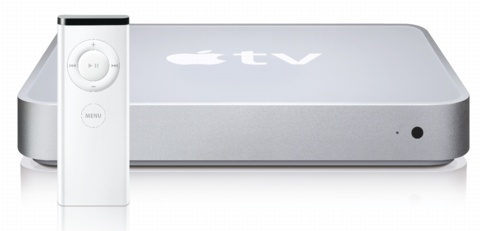
On the TV, the media is accessed via a Front Row-like interface, controlled by a slim Apple Remote. Interspersed with menu choices for playlists and albums, and other methods of browsing the local content, are choices that play movie trailers from Apple’s Web site, connect to the iTunes Store, and more. When you’re not actively using the Apple TV, a screen saver kicks in, with a new multi-photo display of your synced photos.
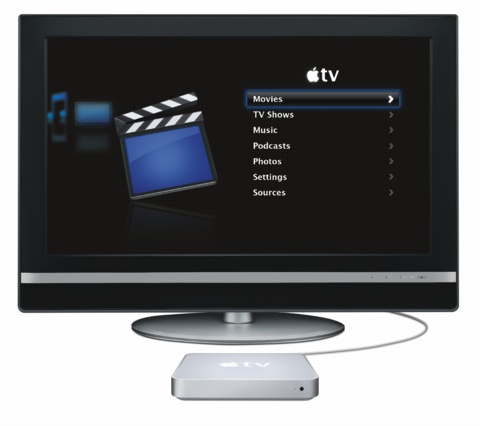
Output ports include HDMI (encrypted digital audio and video), component video, analog audio, and digital optical audio. In terms of connectivity, the Apple TV sports a 10/100 Mbps wired Ethernet port, and 802.11n wireless networking that can also hit 100 Mbps in real world throughput. 802.11n is backwards compatible with 802.11b (AirPort) and 802.11g (AirPort Extreme) wireless networks as well, but 802.11n isn’t yet final, which casts a cloud of doubt over industry-wide compatibility. We anticipate that Apple will ensure compatibility with at least existing and future wireless-enabled devices also from Apple.
A USB 2.0 port is also present, which Apple’s specifications page lists as being “for service and diagnostics.” That’s a pity, because it would be nice to plug in an external hard disk or network-attached storage drive to augment the internal 40 GB drive, as is possible on the new AirPort Extreme Base Station. 40 GB simply isn’t much when it comes to storing video, so it remains to be seen if the Apple TV is more of a media center or a media relay.