- Mark/Space, Inc.
- CS Odessa
- VMware
- Web Crossing
- Fetch Softworks
- Readers Like You!
- Circus Ponies
- Bare Bones Software
- MacSpeech
- Microsoft
Is it a Unicode Font?
To determine if your font is Unicode-compliant, with all its characters coded and mapped correctly, choose the Font in any program (or in Font Book, set the preview area to Custom (Preview > Custom), and type Option-Shift-2.
If you get a euro character (a sort of uppercase C with two horizontal lines through its midsection), it's 99.9 percent certain the font is Unicode-compliant. If you get a graphic character that's gray rounded-rectangle frame with a euro character inside it, the font is definitely not Unicode-compliant. (The fact that the image has a euro sign in it is only coincidental: it's the image used for any missing currency sign.)
This assumes that you're using U.S. input keyboard, which is a little ironic when the euro symbol is the test. With the British keyboard, for instance, Option-2 produces the euro symbol if it's part of the font.
Visit Take Control of Fonts in Leopard
Submitted by Sharon Zardetto
Recent TidBITS Talk Discussions
- Sorting out years worth of files (14 messages)
- 2008 Holiday Gift Ideas: For the Macintosh-minded (22 messages)
- Print Classy Discs with the Dymo DiscPainter (1 message)
- Safari says "host not found" but Firefox works (3 messages)
Published in TidBITS 863. Subscribe today to receive TidBITS in email every Monday.
- Apple Posts $1 Billion Profit for Q1 2007
- Correction: Slow Down There, iCowboy
- Asiva Is Resurrected
- Two Bucks for 100 Mbps 802.11n Enabler
- Take Your Child to Work Day, Macworld Expo Style
- iQuestion the iPhone
- Macworld Expo SF 2007 Superlatives
- Take Control News/22-Jan-07
- Hot Topics in TidBITS Talk/22-Jan-07
How to Google Earth
[Tristan, age 8, wrote this piece the weekend after returning from San Francisco, where he attended Macworld Expo with me for a morning (see "Take Your Child to Work Day, Macworld Expo Style," 2007-01-22). It's by no means the first time he has been mentioned in TidBITS, but it is his first byline! -Tonya]
In Google Earth, you can fly from San Diego (in the United States) to Portsmouth (in the United Kingdom) in two seconds! In fact, you can fly to anywhere on the globe that Google Earth knows about. If you want to see the Great Wall of China, you can! Google Earth works on newer Macintoshes and Windows computers, and the Google Earth Downloads page gives the details for what you need.
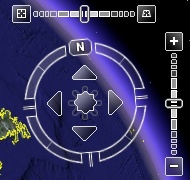
Once you download, install, and run Google Earth, type a place where you want to go in the Search box. Spell it correctly and hit Return. Once you're at your destination, to navigate, notice the controls at the upper right. The vertical bar with the plus and the minus is where you click to zoom in and out. The circle with the N on it is a compass: click one of its four arrows to move in a direction. I suppose you know your directions, but if not, the arrow pointing towards the N is north. The one pointing at the plus and minus is east. The one pointing away from the N is south. And the fourth arrow is west.
I like Google Earth for looking at special landmarks like the USS Constitution in Boston, but I don't think it is reliable, because it often doesn't understand my spelling, and I had trouble finding the HMS Victory because Google Earth doesn't have a way for me to say that I am looking for a ship.
VMware Fusion. The most seamless way to run Windows on your Mac.Backed by nearly a decade of proven virtualization technology.
Try VMware Fusion today for free, or order online for only $79.
Visit: <http://www.tidbits.com/about/support/vmware-fusion.html>


