- Web Crossing
- Mark/Space, Inc.
- Readers Like You!
- Bare Bones Software
- Microsoft
- VMware
- Fetch Softworks
Most Popular Articles
- How to Protect Yourself from the New Mac OS X Trojans (25 Jun 2008)
- iPhone 3G GPS Details, Power Adapter, and Industrial Design (10 Jun 2008)
- Firefox 3 Bounds Forward (22 Jun 2008)
- iPhone 3G Actually $160 More Expensive (11 Jun 2008)
Recent TidBITS Talk Discussions
- 802.11g-n mixed network question (2 messages)
- New Mac threats? (5 messages)
- The Hole in My Backup Plan (19 messages)
- Firefox feature sought (19 messages)
Shopping for a new digital camera? In "Take Control of Buying a Digital Camera," pro photographer Larry Chen helps you pick out the right camera and accessories for your needs and budget. This book is loaded with tips on using your camera, pointers to the best review sites, and more!
Published in TidBITS 874. Subscribe today to receive TidBITS in email every Monday.
- Apple Introduces Eight-Core Mac Pros
- More on Apple/EMI and DRM-Free Music
- Google Desktop Comes to the Mac
- VMware Fusion Beta 3 Draws New Parallels
- Step on a WEP Crack, Break Your Network's Back
- Use iPods Cautiously While Driving
- 3G iPod Owners Beware Compatibility Claims
- Online Backup Options Expand
- Take Control News/09-Apr-07
- Hot Topics in TidBITS Talk/09-Apr-07
Find Strongest Wi-Fi Networks Easily
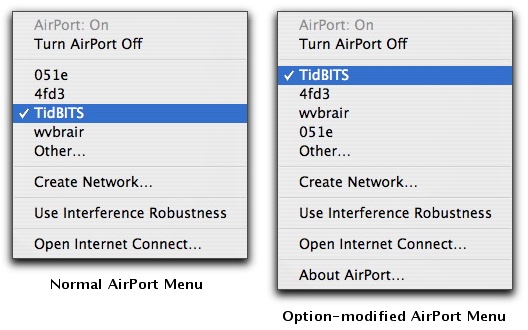
Like most other Mac users, when I'm travelling, I often need to connect to a Wi-Fi network to access the Internet for email and Web browsing. But what if there are multiple available networks and I don't know which would be best to use? In the past, I would usually bring up iStumbler (MacStumbler hasn't been updated in years), but Take Control author Sharon Zardetto Aker alerted me to a simpler method that's built into Mac OS X. If you hold down the Option key when dropping the AirPort status menu, it lists available networks in order of signal strength, rather than the usual (and useless) alphabetical sort. Simple, yet effective, although the signal strength sort should arguably be the default, not the hidden option. Alas, the AirPort menu doesn't indicate which networks require a password for access. If you run into that problem regularly and don't mind running extra software all the time, check out Christoph Sinai's CoconutWiFi, which provides a constantly updating indicator of wireless network accessibility (see "CoconutWiFi Reveals Nearby Networks, Status," 2006-09-11).
VMware Fusion. The most seamless way to run Windows on your Mac.Backed by nearly a decade of proven virtualization technology.
Try VMware Fusion today for free, or order online for only $79.
Visit: <http://www.tidbits.com/about/support/vmware-fusion.html>