Glimpse of GPS Future in iPhone Hack
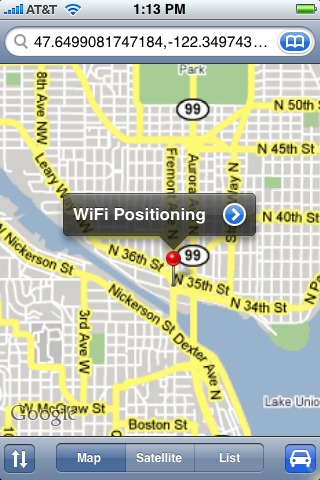
Navizon Virtual GPS for iPhone gives iPhone users a glimpse of a future in which we’ll be able to retrieve our global coordinates as if we carried around a GPS receiver. The Navizon iPhone application uses the iPhone’s constantly updated scan of Wi-Fi networks to retrieve a latitude and longitude based on user-submitted location information. The results are plotted as a point in the Google Maps application. Installation of the program requires that you have not upgraded to the recent iPhone 1.1.1 software (which disabled software add-ons such as this), Nullriver’s AppTapp, and a healthy deep cleansing breath
before accepting responsibility for hacking your iPhone.
(For more information about the 1.1.1 update, see “iPhone 1.1.1 Adds Features and Updates Security,” 2007-09-07, and “Staff Roundtable: Apple Should Do No Harm to iPhones,” 2007-09-07.)
Perhaps uniquely for these early iPhone applications, Navizon charges $24.99 for its software after a 15-day free trial. They say this money is plowed into its rewards program, which pays anyone with a real GPS who participates in the system based on how they capture new data. You get $19.99 if you rack up 10,000 points (10 points for each cell tower and 2 points for each Wi-Fi access point). Navizon’s full-featured software is available for a variety of mobile devices, including handhelds based on the Windows Mobile, Symbian, and BlackBerry platforms; and for Mac OS X and Windows XP/Vista.
In testing recently, despite having a dozen Wi-Fi networks within reception range in my office, Navizon placed me a few miles away. The following day it put me within about 100 feet. Navizon’s software offers buddy tracking, location-based directory searches, and geotagging, letting you create a note that’s paired with a set of coordinates.
Navizon’s only real competition for this space comes from Skyhook Wireless, which relies on hundreds of wardriving trucks that meander carefully around hundreds of cities worldwide to pair Wi-Fi signals with GPS-retrieved coordinates (see “Loki Here,” 2007-06-18). Skyhook licenses its constantly updating database, and offers Loki, a program for retrieving coordinates via a Web browser on the Mac. They have a more extensive toolbar with location-based directories and form-filling for Windows, which will eventually arrive under Mac OS X, as well.
Of course, what would really be nice is a true GPS chip or simulator built into the iPhone to provide location data to any application that could use it, like Google Maps. It could even plop coordinates into the embedded metadata of photographs taken by the iPhone. All cell phones sold must include location awareness, based on GPS or cell-tower placement, to provide that information to E911 operators. So the iPhone has it – almost certainly in the form of cell-tower sniffing. Apple and AT&T are just pretending it’s not there. Perhaps an enterprising hacker will be able to find that data and expose it to other applications at some point.