Listen to Music Online with PandoraBoy
Thanksgiving is past, and December is here, which means that my month-long window for listening to Christmas music is upon me. We have a decent selection of Christmas music ripped to iTunes from our CD collection, but unlike my normal listening habits, where I want to pick the artists quite carefully, Christmas music is all about the genre for me, and I like hearing new takes on favorite songs from artists I’ve never heard before.
The online music service Pandora is great for that. By merely telling it what you like and don’t like, it plays a variety of songs from its broad selection of holiday music (see “Pandora Beats iTunes for Holiday Music,” 2005-10-05). But as much as I like the idea of Pandora, the fact that it runs in a Web browser bugs the heck out of me. It’s too easy to lose track of the tab Pandora’s using, and if I minimize it to a small window, clicks that open URLs from other applications often end up using that small window if I forget to switch back to a normal browser window after using Pandora’s controls.
A clever little application called PandoraBoy fixes all that. It uses WebKit to display the Pandora player in its own window, but goes beyond that to provide global hotkey shortcuts for rating songs, skipping to the next song, and adjusting volume. It also supports the Apple Remote, provides AppleScript support, updates itself via Sparkle (see “Sparkle Improves Application Update Experience,” 2007-08-20), and uses Growl to notify you when a new song starts playing.
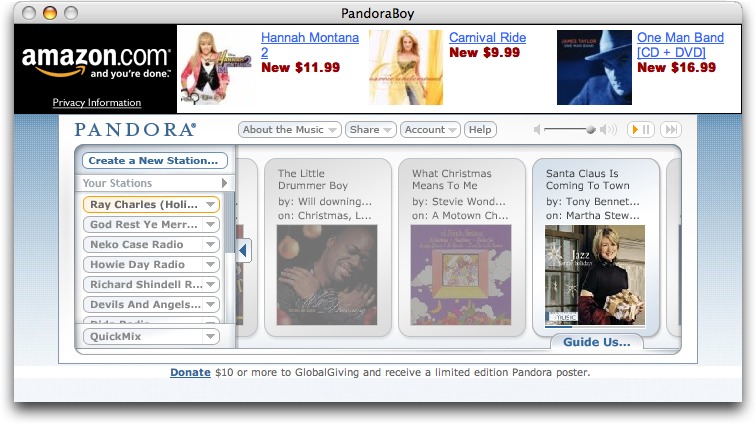
Future plans for PandoraBoy include integration with the iTunes Store (to make it easy to purchase tracks you’ve heard), logging of played tracks, and support for the Last.fm online music service. For now, though, the free PandoraBoy 0.4.2 is a 757K download and works with Mac OS X 10.4 or later.