Outspring Mail Promises Intelligent Filing
While many long-time Eudora users continue to bemoan Eudora’s fate, the developers of QuickMail, another email client that once boasted a significant user base, have released an entirely new email program, called Outspring Mail.
Visually, Outspring Mail uses a three-pane interface, and the program offers all the basics, including support for POP, IMAP, SMTP, and SSL. From there, though, Outspring Mail provides the first notable rethinking of what an email client should do since the appearance of Google’s Gmail. Outspring Mail observes the user’s actions and learns from them, suggesting likely destination mailboxes for messages and even offering to use a previous reply to answer a frequently asked question. Outspring CEO Jeff Baudin said, “If I frequently reply to an email message that says, ‘How do I get to your office?’ or words to that effect; shouldn’t my email program be smart enough to know I’ve replied to this same type of message before? And shouldn’t it
then offer to use one of these replies for the current message?”
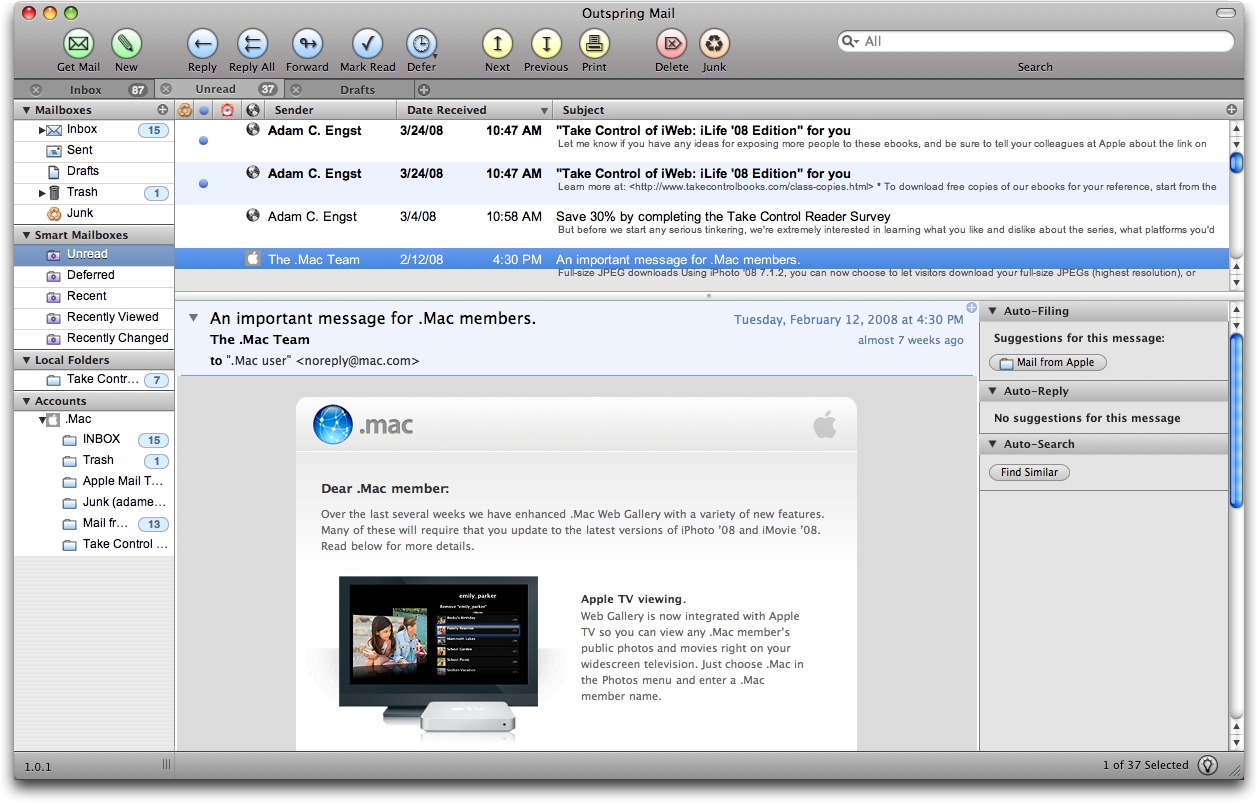
Outspring Mail also debuts a “message deferment” feature that enables the user to defer dealing with a message for a specified amount of time. Outspring Mail then places the message in a special folder, and once the time elapses, moves it back to the Inbox with an indicator that the deferred message has been returned. This feature could help a user keep the Inbox clean, though it’s entirely likely that all those messages that build up in the Inbox normally would just end up being deferred repeatedly and indefinitely.
For people who do most of their scheduling via email, Outspring Mail’s data detectors may prove useful. They search for absolute dates (like 4/15/08) and relative dates (like “next Wednesday”) and convert the text to links that take the user to the associated date in iCal.
Other useful or unique features include a tabbed interface, the capability to find similar messages, a Reply with Template command (similar to Eudora’s stationery feature), message preview with an intelligent summary, the capability to resize and rotate images, smart mailboxes, built-in spam filtering, display of HTML messages, Spotlight-based searching, integration with Address Book, Growl notification for new mail received, colorization of quoted text, and more.
In my initial usage, Outspring Mail felt a little rough around the edges, with one crash and an error dialog that looked as though not all debugging code had been removed. The program did perform basic actions acceptably, and if the performance wasn’t amazing (on a first generation MacBook), the preferences do warn that the auto-filing analysis can slow the program down.
Outspring advertises the program as “Intel Native” and “Leopard Compatible,” but does not provide specific system requirements. It can import mail from Apple Mail and QuickMail, but not other common Macintosh programs. Outspring Mail costs $95, with $59 upgrades from QuickMail. A 10-day demo version is available as a 7.1 MB download.