Prune Your Time Machine Backups Selectively
Time Machine users, rejoice! Pierce T. Wetter III has released a modified version of the open-source GrandPerspective utility (see “GrandPerspective and WhatSize Identify Disk Pigs,” 2007-10-12) – a version that understands the use of file and folder hard links peculiar to a Time Machine backup.
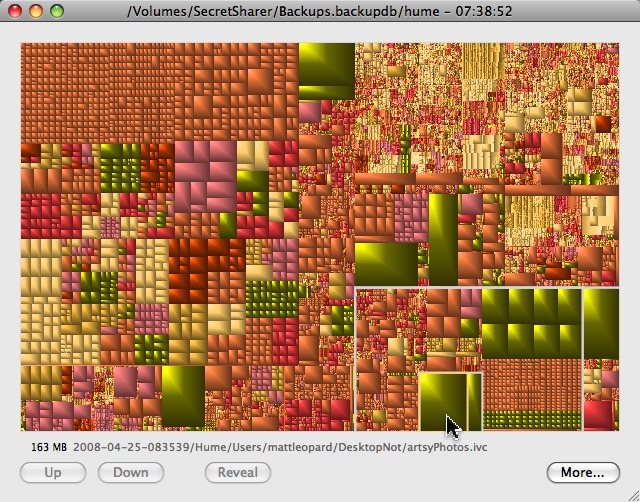
You can use this modified GrandPerspective to scan your entire Time Machine backup folder. Files that appear in more than one backup snapshot are eliminated from view, so you can easily spot large files that are either (1) one-time entries you didn’t really need backed up, or (2) repeated backups of some large file that changes more frequently than you make snapshots. For example, in this screen shot, the large file selected, artsyPhotos.ivc, is unnecessarily backed up three times (it’s the same as the large green file in the center and at the top-center of the picture).
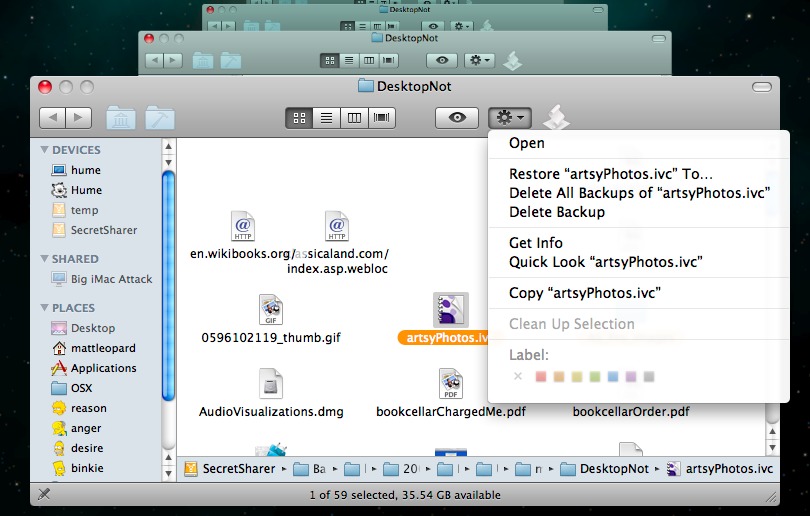
You can then recover some space by entering Time Machine and expunging backups of the troublesome file, as you see me doing here. (See where the Action menu says “Delete All Backups Of…?” It deletes all copies of the file from the backups folder.)
If the presence of large unnecessary backups is diagnostic of some flaw in your backup strategy, you might also like to modify your Time Machine preferences to exclude, explicitly, the troublesome file(s).
I recovered about 10 GB of backup drive space instantly by discovering large files and folders that I had unnecessarily and inadvertently backed up.