Send SMS for Free via AIM on iPhone
I expected that iPhone 3G service from AT&T would be more expensive compared to the original iPhone – $30 per month for data on top of voice service, a $10 increase), but the telco slipped in a poison profit pill by removing SMS text messaging from the plan. Instead, you can pay $5 per month for 200 messages (the amount included in the original iPhone plan); $15 per month for 1500 messages, or $20 per month for unlimited messages. If you sign up for a FamilyTalk plan, your choices are either $30 per month for unlimited or $0.20 per message.
Text messaging is already one of the great bamboozlements of the technology age, given the prices charged for what amounts to a miniscule amount of data transferred. Making the service an extra fee for a smartphone is just cruel.
With the release of the iPhone 2.0 software, you can send SMS messages from your iPhone for free. (To clarify, this appears to work only in the United States; Joe Kissell, who lives in France, reports that the following technique does not work with the “+33” designation there.) The secret is a capability that already exists on your Mac: send it via iChat/AIM. (This technique works on the iPod touch, too, but I’ll just use “iPhone” from here on out to avoid writing “iPhone or iPod touch” over and over.) Here’s how:
- From the App Store, either in iTunes or on an iPhone, download and install the free AIM client for iPhone (link goes to the iTunes store).
- In iChat (or whichever instant messaging software you use), create a new contact whose AIM address is a plus sign and the mobile number of a friend, such as “+12065551212”.
- On the iPhone, launch AIM. Your buddy list is stored on AIM’s servers, so connecting to the service reveals your new buddy.
- Tap the buddy name, compose a text message, and tap Send.

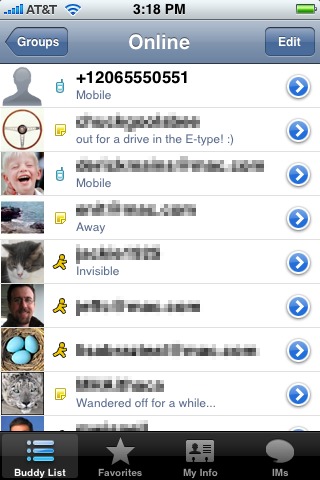

When the other person receives the message and writes a reply, the return message appears in AIM (though the other person will have then paid to send an SMS).
This approach is a bit more work, and if you’re a frequent text message user it may be worth paying AT&T (or whomever your provider is; plans vary widely around the world) for the convenience of just using the SMS application. But if you need to dash off a quick message without wondering if you’re getting your $0.20 worth, AIM is a good alternative. It also helps lessen the pain of getting gouged by greedy telcos.