iTunes 7.7 Corrupts Accented Artist and Track Names
Thanks to Stig Albjerg for alerting us to a subtle problem that has cropped up in iTunes 7.7, Apple’s latest release. Playing or getting info on songs whose artist or track names contain accented characters causes those characters to be swapped with other characters, rendering the names incorrect or even unreadable. For people with large collections of non-English music (or, I imagine, heavy metal!), this is, needless to say, troubling. It affects only MP3 files, not AAC files, and seems to be related to the string encoding format used in ID3v2.2 tags. Thus, it may also affect tracks named with Unicode characters, such as
Japanese or Chinese.
Although not all iTunes users seem to be suffering the problem, I was able to reproduce it in iTunes 7.7 running under Mac OS X 10.4 Tiger. Affected tracks show an ID3 Tag field of v2.2 or earlier in the Summary pane of the Get Info window. The problem occurred only with songs that I ripped before mid-2007 using versions of iTunes prior to 7.3. (Tracks ripped using iTunes 7.0.2 suffer the problem; apparently I didn’t rip anything using versions between 7.0.2 and 7.3, so I can’t quite tell when Apple stopped including ID3 tags in ripped tracks.)
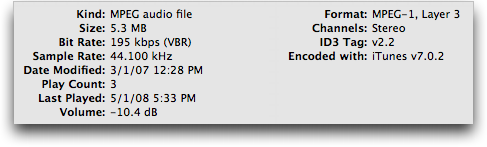
Unfortunately, the only solution for tracks that have been played or viewed in the Get Info window is to correct the artist and track names manually in iTunes. Once fixed, they’ll stay fixed.
Prevention is more important, and for that you’ll want to select the tracks that contain accented characters in iTunes and then choose Advanced > Convert ID3 Tags > ID3 Tag Version > v2.4. Although I’ve seen a report that doing this deleted album artwork, that didn’t happen in my testing. Don’t mess with any of the other options in the Convert ID3 Tags dialog.
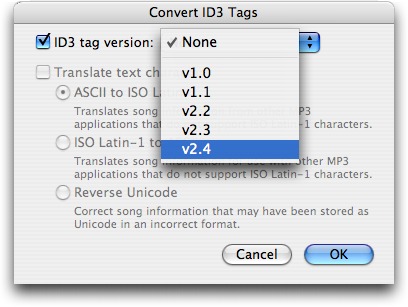
The brute force approach to fixing the ID3 tags is to select everything in iTunes and then do the conversion. Be careful, though. Depending on how many tracks you have selected, it could take some time to modify all the files, especially if your music is stored on a server and accessed over a network. Also, because you’re modifying each file, you will likely end up backing up all those files again, thus wasting a potentially large amount of space in your backup.
For a more focused fix, search for and convert just those tracks that will be affected. Unfortunately, iTunes can’t distinguish between accented and unaccented characters in its search, but there’s a workaround. Using a text editor like Bare Bones Software’s TextWrangler or BBEdit, open the iTunes Music Library.xml file that’s in your iTunes folder. You can then search for various accented characters, and if you’re not sure what they are, look near the end of this thread in the Apple Discussions for a list of common ones. You could also make a copy of that XML file, and then use BBEdit’s Text > Zap Gremlins command to replace all accented characters with a
bullet or other easily found character. Once you’ve identified the affected tracks in the XML file, return to iTunes to do the ID3 tag conversion.
Of course, another option is simply to avoid playing any affected tracks until Apple fixes the bug in a future version of iTunes. There’s no telling how long it will take for a fixed version to appear, if it ever does.