Google Gmail Adds Secure Session Option
Google has plugged one of the biggest security risks associated with using its free hosted Gmail mail service, still in beta after four years. You can now select an option in your account preferences to make every session require an encrypted Web connection. I wrote about a number of Gmail vulnerabilities that researchers had found in “Sidejack Attack Jimmies Open Gmail, Other Services,” 2007-08-27.
Gmail requires a secure connection for your login details, regardless of whether or not you start with the secure Gmail site address. However, if you start at the non-secure Gmail site, Google redirects you back to an unencrypted Web connection after login. That’s always been a mistake on Google’s part because your messages would pass in the clear. The sidejacking attack referenced above also proved that someone could intercept your Google session token and have full access to your Gmail account.
Google explained in its Gmail blog that the service has added a Browser Connection option at the bottom of its Settings > General view that lets you select “Always use https,” which is the protocol name for a URL that makes your browser start up a SSL/TLS encrypted connection with a Web server.

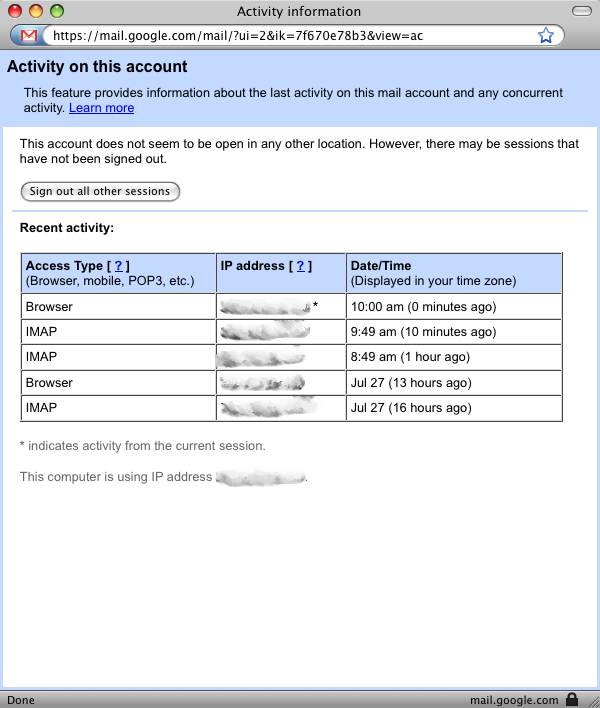
The Google blog also noted a link that’s now at the bottom of the inbox that provides account activity details, as well as a way to sign out sessions initiated from other machines. In my case, for instance, I see several recent sessions: a browser connection last night from home, and IMAP connections from my iPhone for retrieving recent email automatically. (Google is in the process of rolling this feature out, so it may not appear for you quite yet, as it didn’t for Adam Engst).
These two changes improve Gmail’s security dramatically. I recommend you turn on the https setting immediately.