Undelete an iPhone Voicemail Message
There's no Command-Z in the Phone app, but you may be able to retrieve a deleted voicemail message: Open the Voicemail screen in the Phone app. At the bottom of the screen, tap Deleted Messages. To restore a listed message, tap it and then click Undelete.
Written by
Tonya Engst
Recent TidBITS Talk Discussions
- TurboTax 2009 (2 messages)
- Aussie iTunes rip-off (17 messages)
- Activity Monitor mystery (1 message)
- How to copy contents of Address Book card to clipboard? (1 message)
Published in TidBITS 947.
Subscribe to our weekly email edition.
- Sound Different with Apple Soundtrack
- Yet Another Massive Mac Software Bundle
- Adobe Announces Vast Creative Suite 4
- T-Mobile Introduces Branded Google Phone
- Fix 5002 Error When Updating iPhone Apps
- Developers Could Turn Away from iPhone App Store
- TidBITS Watchlist: Notable Software Updates for 29-Sep-08
- Hot Topics in TidBITS Talk/29-Sep-08
Leopard Screen Sharing Loses Hidden Features
For reasons known only to Apple, the mid-September release of Mac OS X 10.5.5 disabled extra toolbar items in the Screen Sharing program - for remote computer access and control - that required configuration via the command line in Terminal. Rob Griffiths of Macworld was the first to document the extra switches on 12-Dec-07, and was also the first to note their removal. Even if you've already enabled the toolbar options, they're gone.
In this modified screen capture that appears in my book, "Take Control of Screen Sharing in Leopard," you can see which features have been eliminated: the quality/color depth setting, screen capture, control/observe toggle, full screen mode, and keyboard/mouse control toggle.
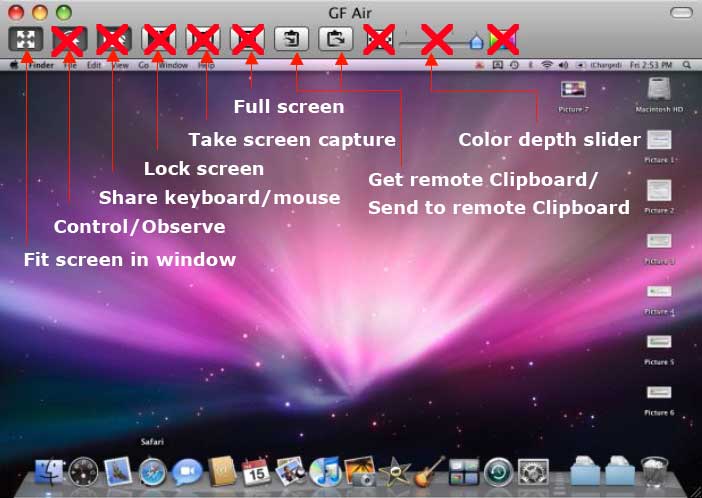
Rob has a couple of pieces of advice on restoring the functions, although I'm not sure I favor either: installing the 10.5.4 version of Screen Sharing, or using Xcode to modify the version in 10.5.5.
But your only other option to get the missing features back, Rob notes, is to purchase the $300 10-user license of Apple Remote Desktop, which is overkill for a few buttons.
CrashPlan is easy, secure backup that works everywhere. Back upto your own drives, computers, and online with unlimited storage.
With unlimited online backup, this is one resolution you can keep.
Back Up Your Life Today! <http://crashplan.com/ref/tidbits.html>

