LogMeIn’s Ignition for iPhone Provides Sleek Remote Access
LogMeIn is the first service I recommend for those without MobileMe accounts who want to establish remote screen connections to computers under their control. The LogMeIn Free service, available for Mac OS X and Windows, enables a Web browser-based remote control session that’s better than VNC and Leopard’s built-in screen sharing. The company, also called LogMeIn, has now built their proprietary remote access technology into Ignition, an app for the iPhone and iPod touch.
Ignition first connects to a LogMeIn account where you’ve registered computers under your control, and after that you can connect to any available computer from a list of machines.
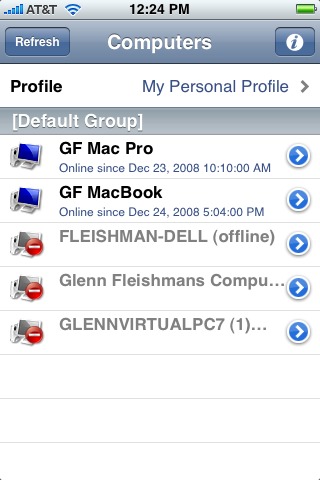
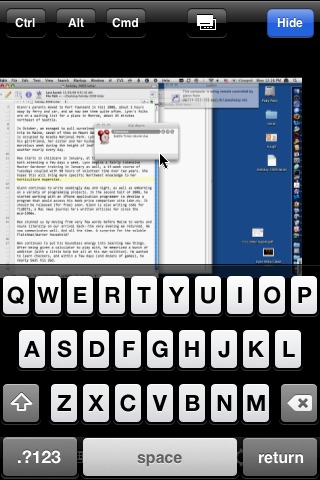
Once you connect, the remote computer’s screen is shrunk to fit the iPhone or iPod touch’s screen, and pinching and expanding works just like with photographs.


In the default mode, you drag the screen under a fixed mouse pointer in the middle of the screen, and tap to indicate a mouse click. That behavior can be switched to perform mouse-like dragging instead. Separate controls let you bring up a keyboard or use Mac OS X’s application-switching Command-Tab shortcut.
At $29.99, Ignition’s price might seem steep, especially compared with free alternatives. But it’s worth the price. I’ve tried several of the other VNC-based iPhone remote access apps, including Jaadu VNC ($24.99), which was previously my best-of-breed choice.
Ignition beats Jaadu VNC and others by pairing with LogMeIn’s centralized registration and connection system. When you install LogMeIn on a computer, the system registers itself with LogMeIn’s servers, and uses a variety of network address translation (NAT) techniques to set up remote sessions. Ignition ties into that centralize infrastructure, where Jaadu relies on a standard VNC setup, which typically requires more work.
I tested Ignition’s remote control capabilities over a variety of networks and was happy with the results. When visiting my parents in Port Townsend recently, I was able to demo the program to my dad with a few taps and clicks, and then pull up a piece of information I’d left on my computer back in Seattle by typing into Yojimbo.
I’ll make my usual plaint here: If Apple would simply add the necessary Bluetooth HID profile to allow a keyboard and mouse to pair with an iPhone or iPod touch, a program like Ignition and a few other utilities would enable many travelers to leave their laptops behind while still having full access to remote machines.